
Nokia Configuration Tool New 3.0
Software
* Nokia Configuration Tool 3.0 (EXE, 7,26 MB)
NOTE: Currently supported Nokia devices include Nokia E51, Nokia E60, Nokia E61, Nokia E61i, Nokia E65, Nokia E66, Nokia E70, Nokia E71, Nokia E90 Communicator, Nokia 9300i, Nokia 9300 and Nokia 9500 Communicator.
* GenVoipSettings 1.1.2 (SIS, 8 KB)
GenVoipSettings is a small Symbian application which allows administrator to modify WLAN RSSI Threshold and Hysteresis values in Eseries WLAN devices using Nokia Configuration tool or Device Management server. Default RSSI value is -80db and Hystere is 10db. These settings are usually only needed for VoIP purposes, but they affect the WLAN functionality in general.
Nokia configuration Tool 3.0 user Guaid
Nokia Configuration Tool
JAU HUAWEI unlock Free, Beta
 Just Another Unlocker 2.5.8
with HUAWEI support
Just Another Unlocker 2.5.8
username : demo
Password : test
Nokia BB5 RPL Maker Free


 Free Nokia BB5 Rpl
This simple tool can:
1. Remove PM 120 section from your back-up PM file, without affecting or altering your original back-up.
2. Remove PM 308 section from your back-up PM file, without affecting or altering your original back-up.
3. Create RPL file from your PM back-up (!!!).
NOTE: The RPL created will only repair SIM LOCK data damaged phones and will not repair 123456789xxxx IMEI or so..
4. Make NPC Killed RPL files.
How To use
1.) type in any usernname
2.) click generate
3.) type in any activation string
4.) submit
Watch Video How to
Mirror
Nokia RPL Free
iPhone SDK 3.1.2 Available for Download

According to the changelog for the iPhone OS 3.1.2, the update contains bug fixes and improvements, including fixes for a sporadic issue that may cause the iPhone to not wake from sleep, an issue that may interrupt cellular network services until restart, as well as a bug that could cause occasional crash during video streaming. On the SDK front, update 3.1.2 brings the following changes, according to Apple’s website:
What’s New in this Version
- Instruments can now profile your application on a device via WiFi connection. Read the release notes for instructions on how to set this up for your devices.
- Organizer: the iPhone Development grouping now collects crash logs, install bundles, and provisioning profiles in a single location.
- iPhone OS 3.1 Simulator uses frameworks more closely matching the device.
“With over 1,000 new APIs, iPhone SDK provides developers with a range of new possibilities to enhance the functionality of their applications,” the company headquartered in Cupertino, California, says. “New APIs also provide support for applications to communicate with hardware accessories attached to iPhone or iPod touch.”
In order to access the iPhone SDK 3.1 and additional technical resources and information from Apple, users must log in with a valid iPhone Developer Apple ID and password. Via the link below, those who aren’t currently registered with Apple can sign up immediately and get access to the iPhone SDK for developing iPhone and iPod touch applications.
Download Apple iPhone SDK (Free)
Quote:
Apple iPhone SDK descriptionAllows one to develop applications that run on iPhone and iPod touchWith this software you can develop applications that run on iPhone and iPod touch. Includes the Xcode IDE, Instruments, iPhone simulator, frameworks and samples, compilers, Shark analysis tool, and more.NOTE: In order to download this application, you need to log in with your Apple ID. The Apple iPhone SDK 3.1 Beta 3 is for development and testing only and should be installed on devices dedicated to iPhone OS 3.1 beta software development.WARNING: Before installing and developing with this version of the iPhone SDK, you must first upgrade your Mac system to Mac OS X v10.5.7 or later.What's New in This Release: [ read full changelog ]· Instruments can now profile your application on a device via WiFi connection. Read the release notes for instructions on how to set this up for your devices.· Organizer: the iPhone Development grouping now collects crash logs, install bundles, and provisioning profiles in a single location.· iPhone OS 3.1 Simulator uses frameworks more closely matching the device.
iPhone SDK 3.1.2 Available for Download
J.A.U new update 2.5.5

 BB5 Self Tests
WHATS NEW? (v2.5.5):
1.) fixed a bug with sequence number reading
thanks to this, many little bugs are now fixed:
*all phones should now be detected perfect
*sx4 auth. should now work like it should (hope so).
2.) fixed wrong imei reading (or half imei reading).
3.) addjusted a about box, with a field to say thanks
to all of you who helped and supported me with
this and other programms.
4.) addjusted the "CHECK UPDATE" button, thanks to this you can
see this news now and see if new update is aviable!
5.) addjusted bb5 selft tests (but iam not finished with
with it and i dont have tested it with jaf).
6.) corrected a bug, now after starting JAU, the main window
stay on top.
7.) now in sx4 auth. log the j.a.u version is displayed too,
this is easyer for me to find error when user found any.
8.) some cosmetical changes
J.A.U new update 2.5.5


SPC TOOL
SPC TOOL
Upgrade or downgrade your bootloader with BootNeuter
But as it still hasn’t been released due to several little bugs that the developer want’s to fix, i will go ahead and review the BootNeuter app first.
I’ve had a lot of people who ask me, what is BootNeuter and why do i need it.
First let me explain what it does.
BootNeuter let’s you switch between bootloaders (for info about bootloader and baseband go here).
So why do i want to switch bootloader? Without going into to much technical details (if you’d like, we can talk about this, just drop me a mail), for improved Google Location and improved battery life if you’re running 1.1.3 or 1.1.4.
People who are running older firmware versions, should not upgrade to the BL 4.6
Ok now that we have that out of the way, let’s discuss this neutering thing.
What is neutering your bootloader?
-A neutered bootloader gives you absolute control over your baseband. The normal restrictions invoked by apple are completely removed !
-The baseband is no longer integrity-checked
-Can be patched (unlocked or other custom modifications)
-4.6BL will even run with patched baseband ??� no need to revert to 3.9BL even with most recent firmware
Secpack restrictions are removed
-You are free to downgrade your baseband using bbupdater without having to run ieraser/ienew first.
-No longer does the ???greater than??? (4.6BL) or ???greater than or equal??? (3.9BL) rule apply. You can arbitrarily go up and down regardless of what secpacks you use.
Secpack signatures are ignored
-The RSA encrypted header is no longer checked for correct hash values by the bootloader
-The *.fls files can be patched and fed to bbupdater directly
-A copy of the last used secpack will be saved at a03c0000, retrievable via norz or similar dumpers. Not that secpacks even matter anymore.
-Your neuter selection survives iTunes restores and updates
Let’s have a look at the app Bootneuter itself
Warning ! You must be on fw 1.1.4 to be able to bootneuter your bootloader with BootNeuter !!
1) You can locate the app in the tools category of the installer, if you haven’t pwned your device..


2) Before you launch BootNeuter, switch off your Wireless. and make sure your battery is high enough.
3) Let’s launch the app.

4) While the app starts it will determine your settings.

5) when the app stars you can chose your Bootloader version. If you are on 1.1.3 or 1.1.4 and see that your baseband is 3.9.
I recommend that you select the 4.6, activate the neuter and the unlock swithc.
After that press flash and wait some time. The procedure can take some time, so don’t swith of your iPhone while it’s busy !!!
I’ll include some screenshots of me going back to 3.9.
Tjhe principle is the same for upgrading as for downgrading.
The process goes in several stages.
a) First the Bootloader will be flashed.
b) 2nd the Baseband will be flashed.


Et voila .. you’re iPhone’s bootloader and baseband have been bootneutered.
Now all you have to do , is reboot your iPhone , and it’s done.
This big app is available in the Installer.app through the Sendowski packaging source, see our sources page.
Jailbreak iPhone 3.1.2 Firmware with PwnageTool 3.1.4
The infamous iPhone Dev-Team has updated its PwnageTool for Mac to make it compatible with the new iPhone 3.1.2 firmware which was released last week. This latest version of PwnageTool can jailbreak the original iPhone (Edge), iPhone 3G, iPhone 3GS and iPod touch (1G and 2G) running on iPhone firmware 3.1.2. The custom .ipsw firmware files created with PwnageTool can update iPhone to firmware 3.1.2 without updating its baseband so that it can be unlocked to run on any carrier SIM. Also added is the support for jailbreaking iPhone 3GS which are already updated to firmware 3.1.x (including 3.1.2), either out of the box, or directly from iTunes.
The new iPod touch 3G is currently not supported. Complete tutorial/guide on how to jailbreak iPod touch (1st and 2nd generation) running on firmware 3.1.2 can be found here.
If you don’t care about the unlock and just want to jailbreak your iPhone on 3.1.2, then you can also alternatively follow the guide posted here to jailbreak your iPhone with blackra1n in just 30 seconds.
Note For Windows XP/Vista/7 Users: PwnageTool 3.1.4 is for Mac OS X only. Windows users should follow the instructions posted here in order to jailbreak and unlock iPhone running with firmware 3.1.2.
The following step-by-step instructions will help you jailbreak your iPhone running on iPhone firmware 3.1.2 with PwnageTool 3.1.4:
Step 1: Download and install the latest version of iTunes.
Step 2: Now start iTunes and sync your iPhone with your PC so that it backs-up all your important data including settings, apps, music, contacts and photos.
Step 3: Download PwnageTool 3.1.4 and the original iPhone OS 3.1.2 for your version of iPhone (download links given below). Move all these files to your desktop.
Step 4: Start PwnageTool 3.1.4 and select your device:
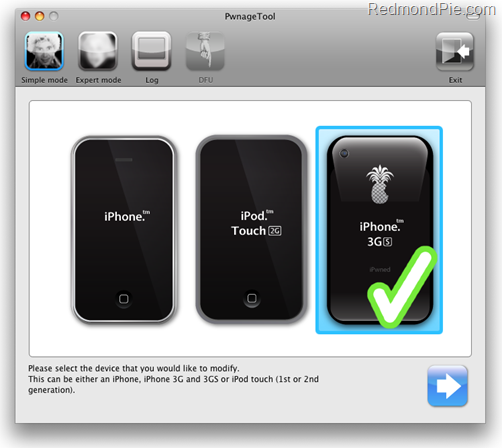
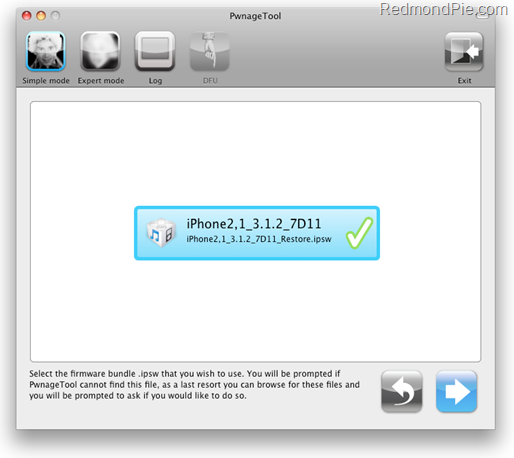
Step 5: PwnageTool 3.1.4 will now automatically detect the correct firmware for your device as shown in the screenshot below:
Step 6: Click on "No" when PwnageTool asks you “Do you have an iPhone contract that would activate normally through iTunes?”:
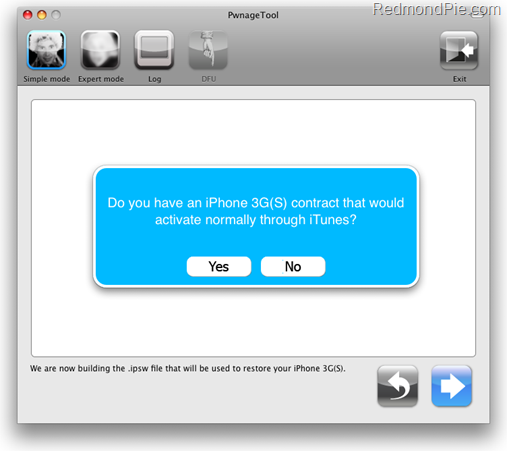
Clicking on “Yes” will update your baseband to the latest version which will make your device almost impossible to unlock. Click on “Yes” only if you are on an officially supported carrier like AT&T.
Step 7: PwnageTool will now create the custom .ipsw file for your iPhone which will be jailbroken.
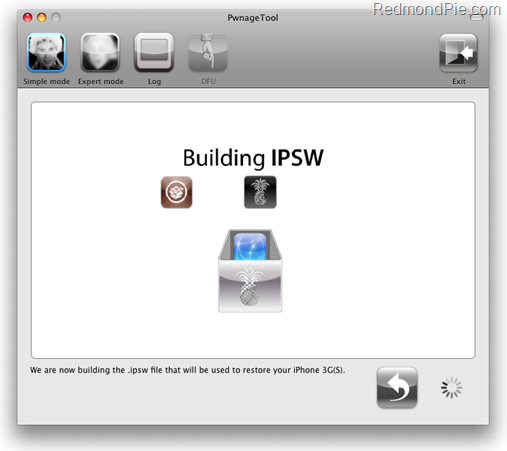
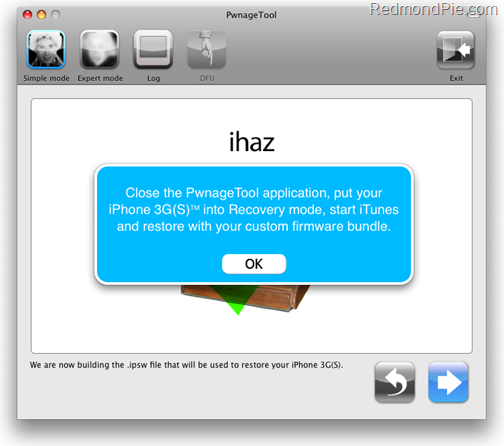
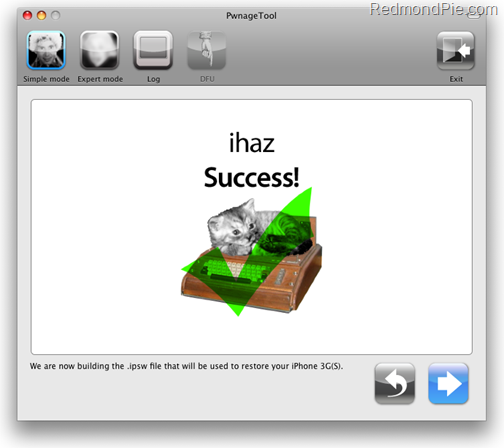
Step 8: Now you will have to restore your iPhone to this custom firmware 3.1.2 that you just cooked using PwnageTool 3.1.4 for your iPhone. Click on your phone from the sidebar in iTunes to get to this screen as shown in the screenshot below:
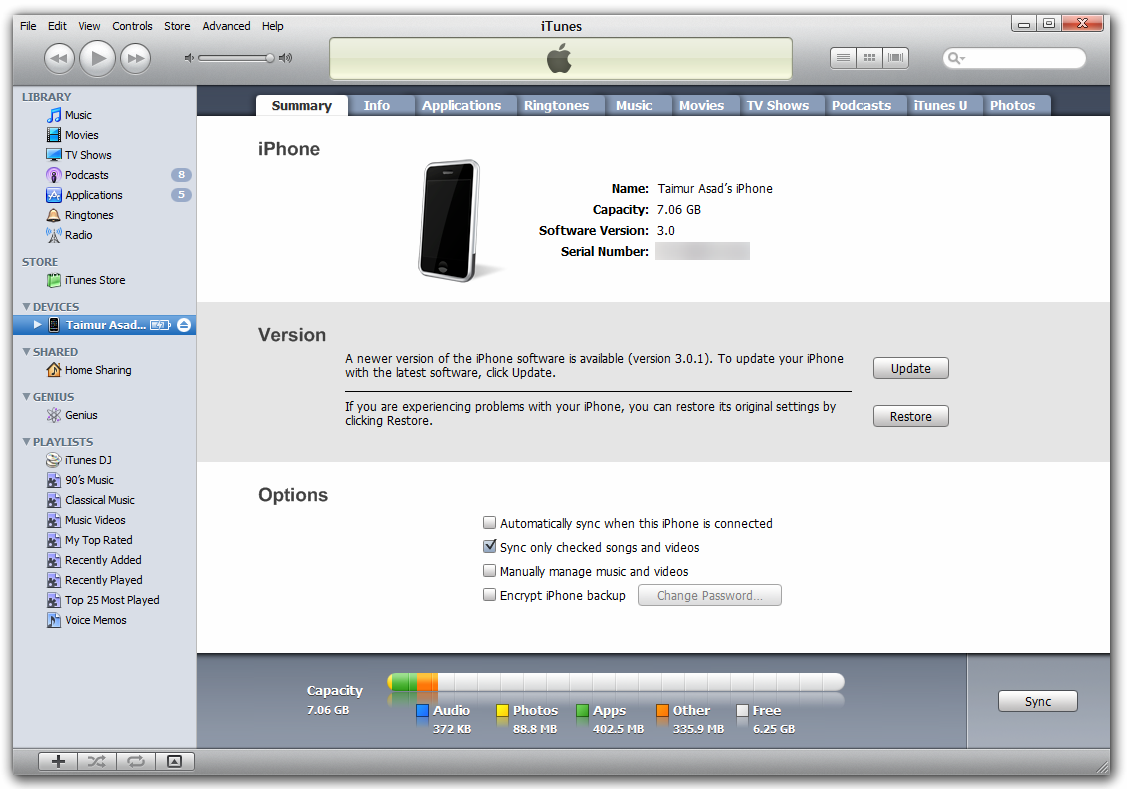
Now press and hold left “alt” button (“Shift” button on Windows) on the keyboard and then click on “Restore” (Not “Update” or “Check for Update”) button in the iTunes and then release the “Shift” button.
This will make iTunes prompt you to select the location for your downloaded custom firmware 3.1.2. Select that custom .ipsw file and click on “Open”.
Step 9: Now sit back and enjoy as iTunes does the rest for you. This will involve a series of automated steps. Be patient at this stage and don’t do anything silly. Just wait while iTunes installs the new firmware 3.1.2 on your iPhone. Your iPhone screen at this point will be showing a progress bar indicating installation progress. After the installation is done, iPhone will restart automatically and you should now have a fully jailbroken iPhone 3GS running on firmware 3.1.2.
How to: Unlock iPhone on 3.1.2:
You can now follow the tutorial/guide posted here to unlock your iPhone on firmware 3.1.2 using ultrasn0w.
Step 10: Once you are done with the unlocking and jailbreak process. You can now restore all your settings, apps, music, contacts and photos to the newly installed firmware version 3.1.2 by restoring the backup that you made in Step 2 from iTunes.
UPDATE 1: Follow the step-by-step guide posted here to fix missing carrier name or logo on your unlocked and jailbroken iPhone 3G/3GS running firmware 3.1.2.
UPDATE 2: Follow the step-by-step guide posted here to Enable Tethering on iPhone 3.1.2 Firmware.
UPDATE 3: You may also like to check out How to: Patch MobileInstallation File on iPhone 3.1.2 Firmware.
UPDATE 4: Native MMS functionality in Messages app on iPhone 2G can now be enabled using the step by step guide posted here.
UPDATE 5: Fix Push Notifications on Hacktivated iPhone 2G/3G/3GS running iPhone firmware 3.1.2 can be found here.
You can follow me on twitter or join our facebook fanpage to keep yourself updated on all the latest jailbreaking and unlocking releases.
Feel free to ask me any question here should you run into any problem during the jailbreak process.
Disclaimer: This guide is for testing & educational purposes only. Follow it on your own risk. I’m not responsible for any loss of important data or malfunctioning of your iPhone.
Download iTunes 9.0.1 for Windows and Mac OS XDownload the Original iPhone OS 3.1.2 firmware for iPhone
Download PwnageTool 3.1.4 for Mac OS
Nokia Cable Finder Version-4 Updated on : 8/10/2009
 Nokia Cable Finder Version -4
With all old and latest modals cable compaitabilty.generation , internal name, main cable,
compatible of main cable with other modals.Modals Pictures and Complete Nokia Codes
Nokia Cable Finder Version-4 Updated on : 8/10/2009

Sony Ericsson Free Flasher
http://www.megaupload.com/?d=L7FZQNA3
SEFP.rar
http://www.megaupload.com/?d=E81XXYAC
jdflasher.rar
http://www.megaupload.com/?d=EOEZU2GQ
jdflasher_full.rar
http://www.megaupload.com/?d=0WK3KY7C
USBFlash_v2.1.0.0.rar
http://www.megaupload.com/?d=8I5IEW6Q
USB_Flash.rar
http://www.megaupload.com/?d=4UEBRC4K
usbflash_v2.2.0.rar
http://www.megaupload.com/?d=8UIQL3A6
Service manual for Samsung I Series
UploadBox :: Downloading i300 SVC.rar
i320 schematic
UploadBox :: Downloading i320 schematic.rar
i320 SVC
UploadBox :: Downloading Samsung SGH i320 Service Manual.rar
i450 SVC
UploadBox :: Downloading Samsung SGH i450 Service Manual.rar
i320 SVC
UploadBox :: Downloading Samsung SGH i320 Service Manual.rar
i450 SVC
UploadBox :: Downloading Samsung SGH i450 Service Manual.rar
i600 SVC
UploadBox :: Downloading Samsung SGH i600 Service Manual.rar
i700 SVC
UploadBox :: Downloading Samsung SGH-i700 Service Manual.rar
i710 SVC
UploadBox :: Downloading Samsung SGH-I710 Sevice Manual.rar
i750 SVC
UploadBox :: Downloading Samsung SGH-i750 Service Manual.rar
i8510 SVC
UploadBox :: Downloading i8510_SM.rar
i900 SVC
UploadBox :: Downloading SGH-i900_SM.rar
UploadBox :: Downloading i550_sm.rar
UploadBox :: Downloading I560V_sm.rar

Sony Ericsson Hard Library By BlackAttack
 Sonyericsson J100
Sonyericsson J2x0
Sonyericsson J300
Sonyericsson K310
Sonyericsson K320
Sonyericsson K510
Sonyericsson K550
Sonyericsson K60x
Sonyericsson K61x
Sonyericsson K750
Sonyericsson K790
Sonyericsson K800
Sonyericsson P990
Sonyericsson W300
Sonyericsson W550
Sonyericsson W600
Sonyericsson W800
Sonyericsson W810
Sonyericsson Z310
Sonyericsson Z520
Sonyericsson Z530
Sony Ericsson Hard Library By BlackAttack

50 Symbian (sis) Games
Fathammer Stuntplane
Midtown Madness 3
Fighters
3D Pet Fish
Motoracer 3D
Rally Pro Contest
Anarchy boxing
Wakeboard
Snake 3d
Cobra attack 2
3D Minigolf
Head 2 head Streetracing
3D ZAPMAN
AglieFighter
Allods
Alonso racing 3d
Another World
ARC Absolute Rally Challenge 3D
Cosmic
Doom
Earth Guardian 3D
Extreme Rally 4x4
Fantom Overdrive
Fatal arena
GEOPOD 3D
Highway 3D
InterStellarFlames
Jet Ducks
Joes Quest
Jungle King
Lemonade Tycoon
LocknLoad
Mad Macs
Major Carnage 3D
Martial Arts 3D
Metal Bluster 2
MGS Fatal Gear
MicroQuad
Need For Speed U
Nokia Flo snowboarding
Rubiks Cube
Sky force
Tank Force
Tetris
VR Pool
Winningfighterfull
Wolfenstein3D
Zoo Tycoon 2
50 Symbian (sis) Games

Windows Mobile Hard reset

Audiovox PPC-4100
Cingular 8125
Cingular 8525
Dell Axim X3
E-Ten M600
Golfiish X500
MDA 3
HP IPAQ10 Classic
HP IPAQ Hx2000 Series PPC
HTC Artemis P3300
HTC Gene P3400
HTC Kaiser TytN (||) 2 P4550
HTC Touch Daimond P3700
HTC Touch Dual -Nike -P5500 16key
HTC Wizard (prodigy) - Kjam -
Imate Jam
Imate JAQ3
Imate JAQ4
Imate JasJar
Imate PDA2K EVDO
Imate Kjam,Cingular 8125
Tmobile SDA
Motorola Q700
Motorola Q Hard reset
NEC Mobile Pro 790
O2 XDA
O2 XDA Atom Life
O2 XDA Orbit
O2 XDA Stealth
O2 Xphone II m
Palm Centre
Palm Tero 650
Palm Tero 750
Palm Tero Z22
Pantech c810
Qtek 1010
Samsung I300
Samsung I607
Samsung I900 omnia
Sendo X000
Siemens SX56
T-Mobile Dash and HTC S620
T-Mobile MDA
T-Mobile Sidekickslide aka Motorola Q700
Windows Mobile Hard reset
 RSD Lite 4.5.7 new
Motorola Flash Backup 3.0.7 new

Features
creates/restores phone memory backups
enables to manage firmware
patch function
built-in flash tool
Requirements
A compatible Motorola phone
USB cable
P2K driver
Windows 2000/XP or higher
Available languages
English
German
Italiano
Lithuanian
Portugues
Russian
Spanish
Tatarish
Ukrainian
Supported phones
Motorola C380Motorola C381PMotorola C390Motorola C650Motorola E1 ROKRMotorola E1000Motorola E1070Motorola E375Motorola E398Motorola E770vMotorola K1 KRZRMotorola K3Motorola L2Motorola L6Motorola L7 SLVRMotorola L7eMotorola U6 PEBLMotorola V180Motorola V186Motorola V188Motorola V220Motorola V235Motorola V3Motorola V300Motorola V360Motorola V3iMotorola V3rMotorola V3reMotorola V3tMotorola V3xMotorola V3xxMotorola V400Motorola V500Motorola V547Motorola V6 MAXXMotorola V600Motorola V620Motorola V635Motorola V980Motorola V9 RAZR2Motorola Z3 RIZR
Download
Motorola Flash Backup 3.0.7 new with keygen
